Mollenia: A Bold and Trendy Display Font for Creative Projects
Looking for a font that commands attention with its bold, tall letterforms and playful energy? Mollenia is the display font you need to elevate your designs. Whether you're crafting logos, headlines, or social media graphics, Mollenia brings a unique flair that stands out in today's visually driven world. But like any design tool, it comes with considerations that can make or break your final outcome.
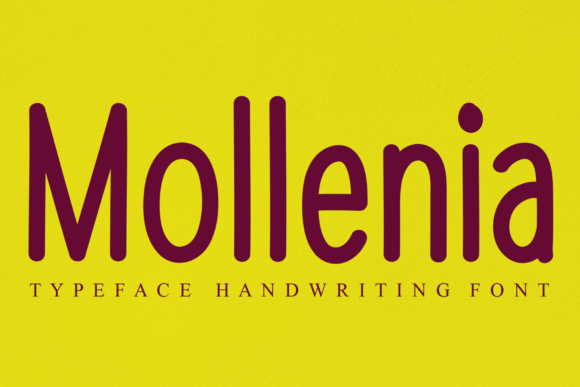
Mollenia is a fun, expressive typeface designed to catch the eye immediately. Its tall, exaggerated letters give it a dynamic presence, making it ideal for headlines, posters, and branding materials where impact matters most. However, many designers overlook key details when choosing or applying this font, which can lead to less-than-ideal results. Let’s explore how to use Mollenia effectively and avoid common pitfalls.
Why Mollenia Appeals to Designers and Creators
The appeal of Mollenia lies in its ability to convey confidence and creativity. Its large, open letterforms create visual interest while maintaining legibility at larger sizes. This makes it especially popular among graphic designers, marketers, and content creators who want to add personality to their work without sacrificing clarity.
Many professionals choose Mollenia for projects that require a modern yet approachable aesthetic. It works well in both digital and print formats, making it versatile for various applications—from website headers to packaging designs.
Common Mistakes When Using Mollenia
While Mollenia is a powerful font, there are several common mistakes that can undermine its effectiveness:
- Using it for body text: Mollenia is a display font, not a sans-serif or serif typeface meant for long passages of text. Using it for body copy can reduce readability and strain the reader’s eyes.
- Overusing it: Applying Mollenia to every headline or element on a page can dilute its impact. Use it sparingly to maintain visual hierarchy and focus.
- Ignoring spacing and pairing: The boldness of Mollenia means that proper tracking and leading are essential. Failing to adjust these can result in cluttered or unbalanced layouts.
- Not considering color contrast: Because Mollenia has high contrast between thick and thin strokes, using it on low-contrast backgrounds can make text hard to read.
These mistakes can affect the overall usability and aesthetics of your design. For example, if you use Mollenia for body text, readers may find the content difficult to digest, reducing engagement and potentially harming your brand’s professionalism.
How to Avoid Common Pitfalls
To get the best results from Mollenia, follow these practical tips:
- Use it for headlines only: Reserve Mollenia for titles, banners, and other short text elements where its bold style can shine without overwhelming the reader.
- Pair it wisely: Combine Mollenia with a complementary sans-serif or serif font for body text. This creates a balanced look and ensures readability across the entire layout.
- Adjust spacing carefully: Use typography tools to fine-tune tracking and leading. This will help prevent overcrowding and ensure your text remains clean and professional.
- Test it on different backgrounds: Always preview your design on various color schemes and screen types to ensure Mollenia remains legible and visually appealing.
By implementing these strategies, you’ll maximize the potential of Mollenia while avoiding unnecessary complications.
What to Check Before Using Mollenia
Before incorporating Mollenia into your project, consider the following factors:
- License agreement: Ensure you have the right to use Mollenia for your intended purpose, whether personal or commercial. Some fonts require specific licenses for web or print use.
- Font file compatibility: Verify that Mollenia is compatible with your design software and platforms. Some fonts may not render correctly on all devices or operating systems.
- File format: Choose the appropriate format (OTF, TTF, WOFF) based on your needs. Web designers may prefer WOFF for optimal performance.
- Web optimization: If using Mollenia online, consider loading times and file size. Large font files can slow down your site, so optimize where possible.
Taking the time to review these aspects before using Mollenia can save you from headaches later on and ensure your design looks great across all mediums.
Real-World Examples of Mollenia in Action
Let’s take a look at a few scenarios where Mollenia works well:
Example 1: A fashion blog uses Mollenia for its header title, paired with a clean sans-serif font for the rest of the content. The bold, stylized title draws attention, while the simple body font keeps the text easy to read.
Example 2: A local coffee shop features Mollenia on its signage and promotional materials. The font adds a trendy, inviting feel that aligns with the brand’s personality and attracts customers.
Example 3: A digital marketer uses Mollenia in email campaigns for subject lines and call-to-action buttons. The font increases click-through rates by making the message more engaging and memorable.
These examples show how Mollenia can enhance communication and visual appeal when used thoughtfully.
Conclusion
Mollenia is a standout display font that offers versatility and visual impact for a wide range of creative projects. However, its effectiveness depends on how it’s used. By understanding its strengths and limitations, you can avoid common mistakes and achieve professional, eye-catching results. Whether you’re a beginner or an experienced designer, taking the time to apply Mollenia correctly will pay off in the quality of your work and the satisfaction of your audience.