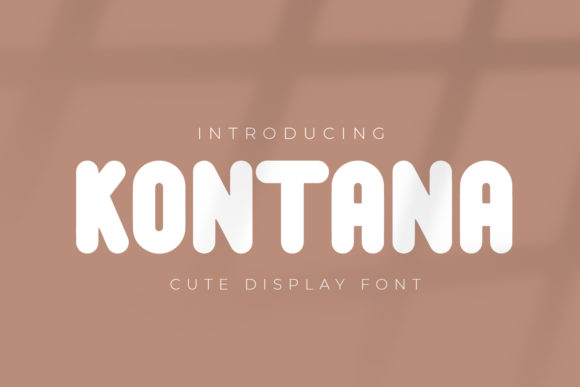
Kontana: A Bold Display Font for Impactful Branding and Design
Kontana is a bold and thick lettered display font that commands attention. Its striking visual presence makes it ideal for branding, product packaging, invitations, quotes, t-shirts, labels, posters, and logos. Whether you're launching a new business or redesigning your brand identity, Kontana can help you stand out in a crowded marketplace. However, choosing the right font isn't just about aesthetics—it's also about usability, readability, and consistency across different mediums.
Why Choose Kontana for Your Projects?
Kontana’s thick strokes and strong character give it a powerful, confident look. This makes it particularly effective for headlines, titles, and any design where you want to make an immediate impact. It works well with both modern and traditional designs, offering versatility without compromising on style.
For entrepreneurs and small business owners, Kontana can be a valuable tool for creating eye-catching logos and marketing materials. Its clean lines and bold structure ensure that your message is communicated clearly and professionally.
Common Mistakes When Using Kontana
While Kontana is a versatile font, there are several common mistakes that designers and creators often make when using it. These errors can affect the overall quality of your design and how your brand is perceived.
- Misusing it for body text: Kontana is a display font, which means it's not suitable for long paragraphs of text. Using it for body copy can lead to poor readability and a cluttered appearance.
- Ignoring spacing and kerning: The bold nature of Kontana can sometimes create awkward gaps between letters if not properly spaced. Failing to adjust kerning can make your design look unprofessional.
- Overusing it in one project: While Kontana is visually striking, overusing it in a single design can overwhelm the viewer and dilute its impact. Balance is key when incorporating this font into your work.
- Not considering color contrast: The thickness of Kontana can make it challenging to pair with certain colors. Poor color choices can reduce legibility and make your design less effective.
How to Avoid These Mistakes
To get the best results from Kontana, it's important to use it strategically. Here are some practical tips to help you avoid common pitfalls:
- Use it for headings only: Reserve Kontana for headlines, titles, and short phrases. This ensures that your design remains readable while still making an impact.
- Adjust spacing carefully: Use typography tools or software that allow you to fine-tune spacing and kerning. This will help maintain a clean, professional look.
- Limit its use per design: Pair Kontana with other fonts for body text and secondary headings. This creates visual harmony and prevents your design from becoming too busy.
- Test with different colors: Experiment with various color combinations to find the best contrast. Darker backgrounds typically work well with lighter text, but always test before finalizing your design.
What to Check Before Using Kontana
Before deciding to use Kontana in your project, consider the following factors:
- Purpose of the design: Is Kontana appropriate for your intended use? If you're designing a logo or poster, it's a great choice. But if you need something more subtle, another font may be better suited.
- Target audience: Consider who will be viewing your design. Kontana’s bold style may appeal to a younger or more modern audience, while others may prefer a more traditional look.
- Medium and format: Kontana works well on digital and print media, but you should check how it appears at different sizes. Some display fonts can become pixelated or lose clarity when scaled down.
- Licensing and usage rights: Ensure that you have the proper license to use Kontana in your project. Unauthorized use can lead to legal issues and reputational damage.
Real-World Examples and Better Approaches
Let’s say you’re designing a promotional poster for a new product launch. Instead of using Kontana for all text, use it for the main headline and pair it with a sans-serif font for the supporting text. This approach maintains readability while still making your headline stand out.
Another example is using Kontana for a t-shirt design. Because the fabric texture can affect how the font appears, it's essential to test the design on actual fabric before printing. This helps avoid unexpected results due to ink absorption or fabric stretch.
If you're creating a logo, ensure that Kontana doesn’t overpower the rest of the design elements. A minimalist background or limited color palette can help balance the boldness of the font.
Conclusion
Kontana is a powerful display font that can elevate your branding and design projects. However, like any tool, it requires careful consideration and thoughtful application to achieve the best results. By avoiding common mistakes and following practical advice, you can ensure that your designs are both visually appealing and functionally effective.
Whether you're a beginner or an experienced designer, taking the time to understand how to use Kontana properly can make a significant difference in the success of your creative work.